Why this project
I was preparing a workshop and needed to expose a url with a specific interface, sparing participants from installing docker or anything else on their machines.
I built the workshop locally with docker compose, which is one of the ways to develop and test locally: it works, it’s fast, it’s reproducible. And then?
Then you need to move everything to the cloud. And as a lazy developer, why not use that same docker compose?
The point isn’t running Docker in the cloud - it’s everything around it: HTTPS, custom domain, machine access, data backups, and the ability to rebuild or tear it all down with one command.
With IaC you can manage HTTPS, custom domain, backups, access and cleanup smoothly: everything in one place, versioned, reproducible. Without IaC, you start from scratch every time.
The usual options:
- Manual EC2 setup: SSH in, install Docker, configure nginx, certbot, and pray. Slow, fragile, and hard to reproduce.
- ECS/Fargate: task definition, service discovery, cluster .. for what ? Using Fargate for a single container is like hiring a moving truck to carry your groceries home.
- Docker on EC2 with Terraform: one
terraform applyto spin up, onebash scripts/destroy.shto tear down. Backups included.
The third option is what I chose because it has the simplest architecture .. and the most complex part depends on your user data !
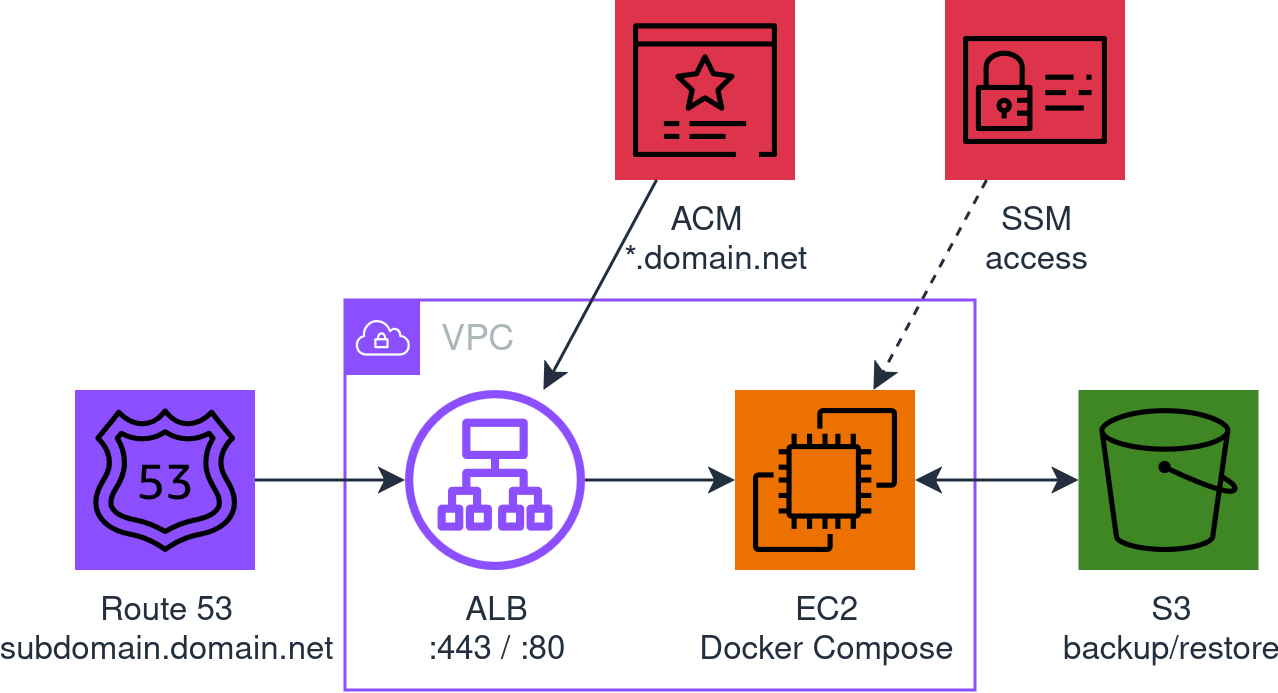
The architecture in the image above is generated directly from the Terraform code (spoiler) in the repo, where you can find the README.md and all the details to use it.
But let’s take it step by step. The third option can be implemented in 1024 different ways: which IaC tool ? How do you handle HTTPS ? How do you access the machine ? Where do you store backups ? How do you manage DNS ? Which AMI ? It depends. The point is asking the right questions.
As a lazy developer, every choice follows one criterion: less effort, in terms of time, cost, or both. And when less effort isn’t enough to decide, the cleanest path is a minimal system: you know what’s there, you know what’s missing, no surprises.
Why Terraform and not CDK
| Terraform | CDK | |
|---|---|---|
| Language | HCL: declarative, simple | TypeScript/Python: powerful but verbose for simple infra |
| State | Local file, zero dependencies | Requires CloudFormation stack, S3 bucket for assets |
| Bootstrap | terraform init |
cdk bootstrap already creates resources in your AWS account |
| Learning curve | Low for simple infra | Need to know both CDK and CloudFormation .. and their quirks |
| Destruction | terraform destroy: clean, predictable |
cdk destroy, which sometimes leaves orphaned resources |
For an ephemeral workshop run by one person, Terraform with local state is the minimum effort. CDK makes sense when the infra grows, you need complex logic, or there’s a team involved.
The choices and why
| Choice | Why (less effort) | The discarded alternative (more effort) |
|---|---|---|
| ALB + ACM | Free HTTPS certificate, auto-renewal, no certbot/nginx | Let’s Encrypt on EC2: port 80 open, cron for renewal, more moving parts |
| SSM instead of SSH | No keys, no port 22, audit trail on CloudTrail | SSH key pair, SG rules, bastion if private subnet |
| S3 for backups | Costs nothing, survives the EC2, simple CLI | EBS snapshot: tied to instance lifecycle, harder to restore |
| Route 53 hosted zone | DNS validation for ACM, alias record for ALB, all managed by Terraform | External DNS only: manual certificate validation or HTTP challenge |
| Amazon Linux 2023 minimal | Clean AMI, you install only what you need | AL2023 standard: doesn’t have Docker anyway, but has hundreds of extra packages you don’t need |
docker compose up --build |
Works with both build and image |
Separate logic for build vs pull: pointless complexity |
| Local state | The workshop is ephemeral, one operator, no team | Remote state (S3 + DynamoDB): cost and setup for zero benefit |
| Conditional VPC | Three modes: use an existing VPC, find the default, or create a new one | Always new VPC: waste for a workshop running in the default VPC |
| Conditional S3 bucket | Pass one and it uses it. Don’t, and it creates one named after the domain | Always new bucket: waste for someone running many workshops and just managing backups |
What I learned (the hard way)
The right AMI and how much disk
As a lazy developer, instead of reading the documentation, one command to see what’s out there:
aws ec2 describe-images \
  --filters "Name=name,Values=al2023-ami-*-x86_64" \
  --owners amazon \
  --query 'reverse(sort_by(Images, &CreationDate))[:10].[Name, BlockDeviceMappings[0].Ebs.VolumeSize]' \
  --output table
Three variants: minimal (2 GB), standard (8 GB), ECS-optimized (30 GB). The ECS one comes with Docker but is meant to run in an ECS cluster, not on a standalone EC2. Standard and minimal don’t have Docker: you need to install it either way.
At that point, what does the standard have that minimal doesn’t ? SSM agent and a few hundred packages you don’t need. The package comparison page confirms it: no Docker, no buildx, nothing that changes the picture.
Minimal is the cleanest choice: install Docker, SSM agent and buildx in the user data, and you know exactly what’s on the machine. One thing to watch: the 2 GB disk isn’t enough, set volume_size = 20 and move on.
ssm-user is not root
When you connect with aws ssm start-session, you’re ssm-user. You don’t have access to the Docker socket. Everything needs sudo. Commands sent with aws ssm send-command run as root though, so sudo is built in.
buildx: no buildx, no build
From Docker Compose v2.17+ the --build flag requires buildx >= 0.17.0. The minimal AMI doesn’t have it. Without buildx, docker compose up --build fails even if no service uses build: install it in the user data and forget about it.
That damn cache
After a destroy + redeploy, the new Route 53 hosted zone gets different nameservers. You update the NS records on the DNS provider, everything looks fine. But the browser says no.
dig @8.8.8.8 tells you it’s all good. But your local resolver disagrees.
What happens: your ISP’s resolver has the old SERVFAIL cached, and until it expires, that domain doesn’t exist as far as it’s concerned.
The fix: temporarily switch your local DNS to Google (8.8.8.8) and wait for your provider’s cache to expire: they say 5-10 minutes, but sometimes (way) longer.
Anything else to add ?
When it’s not a workshop of a few hours but something that lasts weeks or months, it’s worth investing extra effort to make the system hold up over time. But remember, it’s always a temporary solution !
- More subdomains: more applications on the same ALB, with routing rules, separate target groups, and potentially more containers on the same EC2 or, if needed, dedicated EC2s per service
- Tactical scheduling: start/stop the EC2 to save money off-hours, periodic backups with EventBridge + SSM, not just at destroy
- CloudWatch alarms: basic monitoring (CPU, disk, health check) with SNS notifications
- Auto-recovery: ASG with min=max=1 to replace dying instances (user data restores everything from S3)
- Spot instances: for workshops that tolerate interruptions, ~70% cost reduction