The tournament lasts one evening. What about the site ?
AWS Card Clash is a card game by AWS: you build architectures, and you can play alone or against somebody by handing them a join code. On the web you sign in with an AWS Builder ID, on mobile with nothing at all. I wanted to run a tournament for the local AWS User Group, and the game does not manage a competition: it does not know who takes part, who has already met whom, how many points each of them has. All of that had to be built around the game, and for the moment AWS does not provide it.
I needed a site to run the competition, and it would then sit still for months. A tool you pull out when you need it, use, and put away.
The first questions are about management: what the site costs while nobody uses it, whether it is worth rebuilding from scratch every time, and, if so, how much work it takes to put it back up for the next tournament. And the answer is a system that comes back up in the time of a deploy, or that stays silent until it is needed.
What is needed is a serverless solution, costing nothing except when calls come in, and a few dollars per competition: I used the classic AWS patterns, composing them in blocks. The details of the patterns used are in the README of the project. For the curious, there is a portal dedicated to AWS patterns, useful when you have no idea which solution fits your case.
Serverless on purpose
A single definition, good locally and in production
As a lazy developer I started from Terraform, which is my default by now, and I tried LocalStack to have a local API as close as possible to the real one. I hit three walls in a row.
- I pulled the latest version of the image,
localstack/localstack:latest, which does not start without a token: paying for testing was out of the question, when there is so much open source around. A free license does exist, the Hobby plan, and for a non-commercial project like this one it would have been legitimate, but HTTP APIs, which our whole API is built on, start from the Base plan up - The community image
localstack/localstack:3starts without a token, but the AWS provider v6 of Terraform is not compatible with it: v5 is, the same age as the image - And the decisive wall:
apigatewayv2is not in the community image, which does not support thenodejs22runtime either
The alternative was writing myself a development server that would build the event and route it to the handlers. A hundred lines or so. My lines, to maintain, to emulate something that AWS already emulates with SAM.
The choice was SAM as the only infrastructure, both locally and in production: sam local start-api on one side, sam deploy on the other, one template as the source of truth.
SAM handles everything in fewer lines:
| Part | Terraform | SAM/CloudFormation |
|---|---|---|
| Cognito | ~50 | ~70 |
| S3, with public access block and origin access control | ~35 | ~45 |
| CloudFront | ~80 | ~95 |
| serverless: Lambda, API Gateway, IAM, DynamoDB | ~165 | ~90 |
| total | ~330 | ~300 |
SAM is more verbose on Cognito, S3 and CloudFront, because there it is plain CloudFormation against the HCL of Terraform. But it is far more concise on the serverless part, because Events of AWS::Serverless::Function generates the routes, the permissions and the role by itself. What tipped the scales further toward SAM is not in the table:
- with Terraform two tools were needed anyway, one for the infrastructure and something else to have the API locally: LocalStack, or a development server written by me
- with SAM it is one, and it handles both the local tests and the deploy on AWS
Docker stays either way, and it is the same set of containers: DynamoDB Local, which the backend tests need, and Nginx for the frontend.
The only difference between local and production is authentication: locally it stays fake, because not even sam local emulates the Cognito authorizer. LocalStack would not have solved it for free either, since Cognito sits in the paid plan.
How the blocks are put together
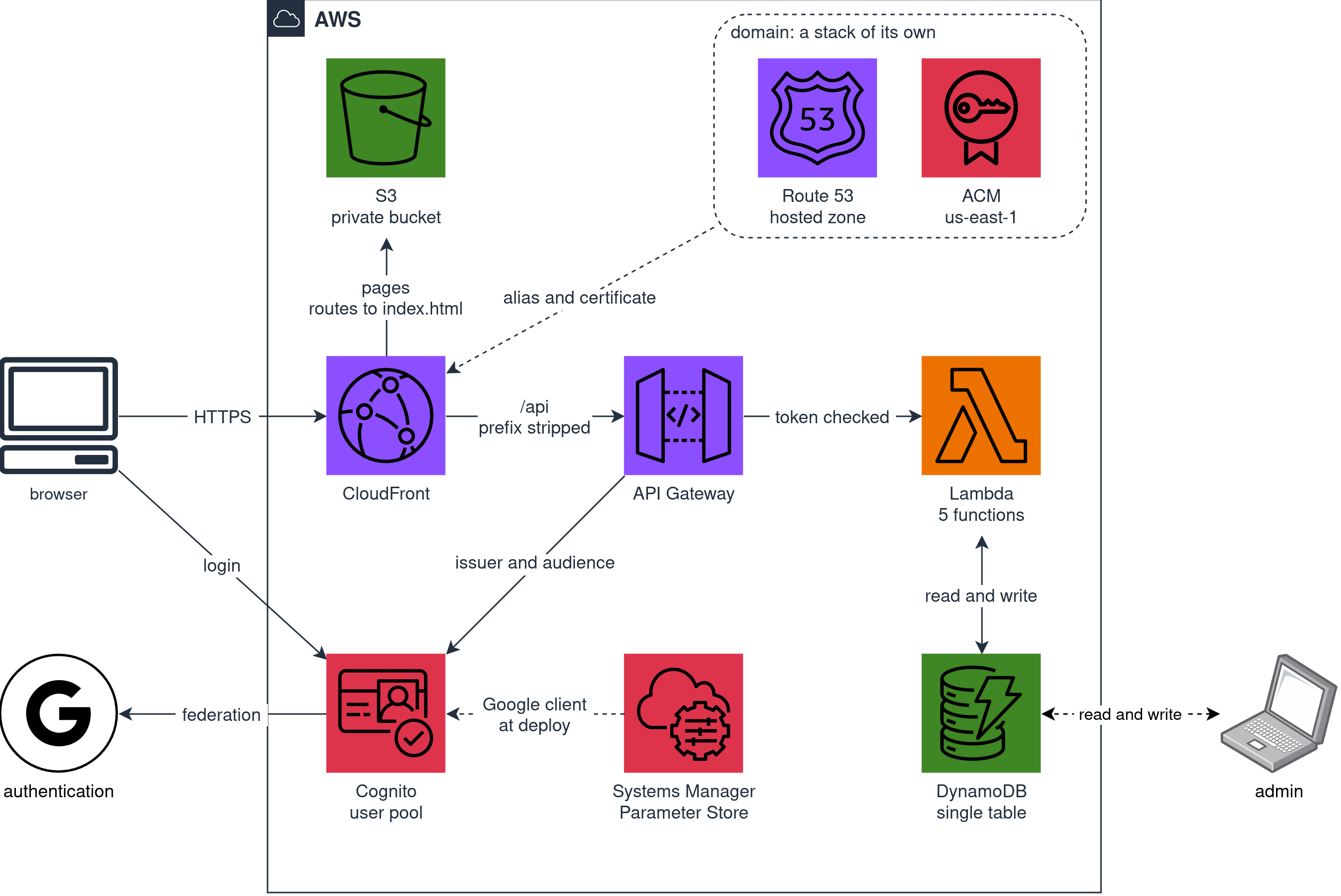
There are four blocks. Identity, backend and site travel together, in a single deploy split in three parts. The domain is a separate deploy, for a precise reason: it is the only piece that can be switched off on its own.
Whoever arrives through the browser sees one address only: in front there is a CloudFront distribution with two origins, the frontend pages in a private S3 bucket only it can read, and the backend HTTP APIs under /api. Since site and API sit under the same domain, the browser asks for no CORS permission: there is nothing to authorize.
That /api is stripped by a CloudFront function, before the API sees the path: its routes stay /competitions and /users/me, as if the prefix had never existed. Locally it is Nginx doing the same job. The prefix serves the site alone, to tell its own pages from the calls, and the API has no use for it: if one day the API moves to an address of its own, like api.pandle.net, the routes do not change.
Everything in eu-west-1, with one unavoidable exception: the CloudFront certificate has to sit in us-east-1. And since a CloudFormation stack lives in one region only, that certificate cannot stay with the rest: this is why the domain deploy is applied in Virginia. Moving everything would have simplified the certificates, but it would have put personal data outside Europe and added latency to every API call.
Who gets in
Nothing is open: every API route demands a token, and without signing in the site shows the login page only. It is a minimal site, meant for the people in the tournament.
There were three alternatives. AWS Builder ID would have been the most coherent, given that the game is played with it, but it is not an identity you can federate with: Cognito accepts Facebook, Google, Amazon and Apple, plus generic OIDC and SAML, while AWS describes the Builder ID as a personal profile giving access to some of its tools. What closes the circle is that you get into the Builder ID itself with Google, Apple, GitHub or Amazon: whoever plays already has one of those accounts.
Facebook does federate, but configuring it is a lot of work, and not everybody has one anyway. Email and password were out from the start, because I did not want to handle sensitive data. Google is left, with the advantage that if you have no account, you make one in a few clicks.
The Google configuration is done once, because it only knows the address to send the browser back to after signing in, and that address belongs to Cognito, not to CloudFront. If I accept that during the sign-in an amazoncognito.com is read instead of my own domain, that address never changes again: I can destroy and rebuild everything as many times as I like, change the address of the site, add a domain, and I never go back to the Google console, not once.
It is an explicit trade a lazy developer will take: an ugly address for three seconds during the sign-in, in exchange for the one manual configuration of the project that never has to be done again.
What standing still costs
With no competition running this system costs nothing: API Gateway and Lambda are paid per invocation, DynamoDB on-demand per request, CloudFront per traffic, the site in S3 is under a megabyte, Cognito is free well beyond our numbers. So if you do nothing, you pay nothing.
With one exception, and everything else comes from it: the Route 53 DNS zone costs half a dollar a month regardless, whether anybody queries it or not. It is the only service on a subscription, so it is the only resource worth switching off, and it is also the most awkward to switch back on, because, unless everything is managed inside AWS, a new zone has new nameservers to carry over to the registrar. This is why the domain is a stack of its own, the one in Virginia, that goes up and down alone, while everything else can stay up and working on the CloudFront address.
The things you only find out along the way
You forget about SAM once you start using Terraform
SAM and Terraform reach the same result by different roads. SAM writes a template and hands it to CloudFormation, which is the AWS service that keeps track of the deployed resources and decides by itself in which order to create them and destroy them. Terraform does that bookkeeping itself, in a state file of its own, and talks straight to the API of each service. The differences that follow all come from here.
A best practice that makes things harder
The first example is the chain of callbacks. Cognito has to know where to send the browser after signing in, and that address is the CloudFront one; CloudFront has to know where the API is; the API has to know which pool checks the tokens. Put like that it is a circle, and CloudFormation refuses circles.
With Terraform the circle is not there, and not to its credit: because it builds the graph resource by resource, and at that level the client needs the distribution, the distribution needs the API, and the API needs neither. CloudFormation with nested stacks builds it stack by stack, so if a resource inside Auth needs a resource inside Site, the whole of Auth has to come after the whole of Site.
The habit of splitting templates, picked up with Terraform, is paid for here: in a single template the problem would not exist. I kept the split anyway, because three files read better than one long one, and the circle is closed by applying the deploy twice: on the first pass Cognito receives the address of the development server, which is the default value of the parameter, and meanwhile the distribution comes up; on the second the command reads the real address from the stack outputs and hands it over. From the second deploy on, the second pass finds nothing to change.
The blind spot of CloudFormation
The second example comes from the same root, and it is more treacherous because it gives no error. The Google credentials sit in Parameter Store and the template read them with a dynamic reference. If the value in the parameter was changed and the deploy was run again, Cognito kept presenting the old one to Google.
The reference sat in a nested stack, and CloudFormation reads it again when it updates that stack. From the point of view of the parent nothing had changed, same child template and same parameters, so the child was not touched and the new value was never read. Granularity again: the unit of re-reading is the stack, not the resource. Terraform with a data source resolves it at every plan, and does not have the problem.
The solution was to stop reading it from the template and to pass it as a parameter from the deploy command: when the value changes, CloudFormation sees a difference and updates.
The resources that belong to nobody
The third example is the one that cost me the most time, and it is the only one where I have the same design built with both tools: SAM with bilardi/aws-card-clash, Terraform with bilardi/aws-docker-host. A certificate is validated over DNS: ACM writes a record inside the zone and then asks public DNS to confirm it. In CloudFormation you can only declare the certificate pointing at the zone, and the record is left to ACM: it is an unavoidable delegation that lets you write a single line of code. In Terraform you write that record yourself, as an explicit resource, and it is three lines more.
The difference shows only when you switch off. make destroy-domain died with The following resource(s) failed to delete: [HostedZone]: the certificate was gone, but the zone was not empty, because the validation record was still inside it. That record belongs to no stack: ACM wrote it, CloudFormation does not know it exists, so no deletion carries it away, and Route 53 does not delete a zone holding anything beyond its own NS and SOA.
With Terraform this does not happen, and again not to its credit: because those three extra lines put the record in the state, so the destroy carries it away and the zone is left empty. The convenience of writing one line in CloudFormation is also the problem: by hiding the resource, it hides that somebody will have to delete it.
The fix is a script that empties the zone of everything other than its NS and SOA records, called by make destroy-domain before the deletion. It reads the zone from the stack resource and not from its outputs, because it has to work on a stack already left in DELETE_FAILED by this very problem.
Log groups are of the same family. Nobody declared them, so Lambda created them at the first invocation, and they did not belong to the stack: the destroy did not carry them away, leaving the logs orphaned. A cost that stays when the site no longer exists, which is the exact opposite of the idea of the project.
The problem is solved by declaring them in the stack, with a name of ours and a retention decided by us, and telling the functions to write there.
When the first deploy fails
The last difference turns up the first time a deploy goes wrong. With SAM or CloudFormation, a create gone bad leaves the stack in ROLLBACK_COMPLETE, which is terminal: the next deploy does not start again, it stops there, and you have to delete the empty stack and wait for it to disappear. Terraform is more practical here: it has no terminal state and applies over it again.
When an operation fails, SAM and CloudFormation prefer to leave something to look at rather than delete. There is an option to delete everything in that case, and it is added to the command that creates the stack: sam deploy --on-failure DELETE. Underneath, when SAM calls CloudFormation, it becomes the same parameter on create-stack.
Constraints
The first: a project called aws-something, as in our case aws-card-clash, cannot name all of its own resources after itself.
- Systems Manager reserves parameter names beginning with
awsorssm - Cognito refuses the prefix chosen for the sign-in page, which is the first part of that
amazoncognito.com, if it containsaws,amazonorcognito. The name availability check passes, which shows that available and valid are two different checks, and for the second there is no command: you find out when you try to create it
The second: the CustomErrorResponses are the documented best practice to serve a single page application from S3, that is “when the origin answers with an error, serve index.html with status 200”, and they work as long as there is one origin behind the distribution. Ours has two, the site and the APIs, and one rule on errors holds for the whole distribution: so the API 404s became index.html with status 200 as well. And the backend uses those codes to speak: it is with a 404 that it says “you are not signed up”.
With more origins, then, the CustomErrorResponses have to be replaced by a CloudFront function attached only to the requests headed for the site, deciding whether to serve a file or the application before looking for anything.
The criterion is the dot: if the address contains one it is a file, like assets/index.css, and passes through untouched; if it does not, it is an address of the application, and becomes index.html. From there the constraint: no address of the site can contain a dot, and the only variable part is the identifier of a competition, which the validation schema keeps to lowercase letters, digits and hyphens.
One residue is left: an address with no dot that the application does not know still returns index.html with status 200. To give a real 404, the function would have to know every address the application serves, keeping a copy of its routes and updating that copy at every change: it costs more than it solves.
Half a second spent waiting for the processor
The site felt slow, so I pulled the milliseconds from the REPORT lines on CloudWatch: the first call after a pause, the one called a cold start, cost around half a second, against the tens of milliseconds of a call right after the previous one. On all five functions, and this is the detail that steered everything: a penalty that is the same for functions doing different jobs cannot be the work of the queries. It is the part they all do the same way, loading the interpreter and the libraries before running their own code.
One figure closed off one avenue immediately: the Lambda functions were configured with 256 MB of memory and used 111 MB at most. More than half was left over: the problem was elsewhere.
On Lambda memory buys more than space: it buys the share of processor as well. Raising the memory from 256 to 1024 MB, the penalty dropped by a factor of four on all five functions, from 410-576 to 93-137 ms, and the processor had been multiplied by four. It was the processor that was missing.
Meanwhile performance improved unexpectedly for another reason. The automatic refresh of the pages had been moved from ten seconds to five to halve the wait before a person notices that something has changed. Asking more often makes every single request cheaper: calls ten seconds apart cost around 200 ms, and at five seconds that cost is gone. It looks like a connection held open and dropped when it stays idle too long.
That cost drops by the same factor of four as well, from around 200 to around 50 ms. If that is what is happening, the cost has two parts: the network round trips to negotiate the connection and the computation to exchange the keys. The processor can only shorten the computation, so a penalty that drops by four would point to the weight being there, not in the round trips.
Lambda charges memory multiplied by time, so four times the memory for a quarter of the time gives the same product. On one of the five functions it works out exactly: 0.25 GB for 0.414 seconds makes 0.104 GB-seconds, and 1 GB for 0.105 seconds makes 0.105. The same number. Four times the speed for free. There is a price, though: the warm calls were fast already and did not shorten, and in GB-seconds they cost four times as much. These are tiny figures against the free tier, but the rule “raising the memory is free” holds for work bound to the processor, not for everything. The five pairs of measurements are in the table of PERFORMANCE.md.
For a person arriving on the site, the page of a competition calls three functions and went from some 700 ms of API time to around 220 ms.
What is missing, and when it will be worth it
The domain, as it stands, has one step that cannot be automated: the nameservers of the zone have to be carried over by hand to the external registrar, and since a recreated zone has new ones, that step has to be done again every time it is switched back on. It would disappear by keeping everything inside AWS: if the parent zone lived in Route 53 in the same account, the delegation would be a record the stack creates by itself, and switching the domain on would go back to being a single sam deploy.
The domain is optional: for one evening the CloudFront address can be enough.
The site has no organizer role: whoever gets in is a possible participant, and that is all. Everything the person running the tournament needs is done from the command line: from loading a competition to taking out whoever left without saying so, and some operations, like deleting a person, are done by writing straight into DynamoDB.
What is missing, then, is a role: somebody who from their own page can do the same operations without opening a terminal. As long as the organizer is the one who wrote the site it is not a problem, but it is the first thing to add if somebody else uses it.
It could be worth running a stress test with many users, to see when it pays to change the AWS pattern. As long as the tournaments have thirty people in them, the solution holds without effort: a few hundred matches, payloads of a few kilobytes, and the number of round trips to the database does not change with how many rows there are.
When there are many more people, what grows is concurrency, and here it helps to know how Lambda works: AWS creates a copy of the function, an instance, for every request arriving while the others are still running. A freshly created instance has to load everything before it can answer, and that is the cold start, the extra wait paid by whoever arrives first. Then it stays there for a while, and whoever arrives right after finds it ready. Back to the example: thirty open pages, with three calls each every five seconds, make some twenty requests a second, and the more requests overlap, the more instances have to be started, each with a cold start to pay.
A stress test would answer the questions how many people can refresh every five seconds and at what point paying per invocation stops being worth it, before considering the replacement of the API Gateway / Lambda pattern with ALB / ECS Fargate. With thirty people the question is theoretical, with a few hundred it stops being so.